
You have probably heard that an ATS resume gets "rejected by a robot" before a human ever sees it. It is the most repeated scare in job searching, and it sends people into hours of font tweaking and keyword stuffing. The reality is less dramatic and more useful: an applicant tracking system is mostly a database, and the way you build your resume decides whether that database reads you correctly.
This guide covers what an ATS actually does with your resume, which parts of the folklore are myths, the formatting choices that really matter, and a short checklist you can run before every application.
Key takeaways
- An ATS parses your resume into fields (name, jobs, dates, skills) so recruiters can search and sort. It is not, in most companies, an automatic rejection machine.
- The risk is a bad parse: if your layout scrambles your job history, a recruiter searching the database may never find you.
- Knockout questions (work authorization, required licenses, location) are the most common automatic filter, and they are about your answers, not your formatting.
- A simple, single-column, text-based resume that mirrors the language of the job description is safe in every system.
What an applicant tracking system actually does
An ATS is software that stores applications and moves them through hiring stages. Jobscan, which sells resume tools and tracks this, reports that 98.4% of Fortune 500 companies use one. So you will meet an ATS on almost every large employer's careers page, and on plenty of small ones.
When you upload a resume, three things happen:
- Parsing. The system reads the file and tries to pull out structured data: contact details, employers, titles, dates, education, skills.
- Storage. That data goes into a searchable profile attached to the job you applied for.
- Review. A recruiter or hiring manager opens the profile, searches by keyword or filters, and rates or moves candidates forward.
Notice what is missing: a step where a program reads your resume and quietly decides you are not good enough. Some systems do have that capability, as we will see, but it is something an employer switches on deliberately.
The "75% of resumes are rejected by ATS" myth
The statistic that most resumes never reach a human has no research behind it. According to an investigation summarized by The Interview Guys, the figure traces back to a 2012 sales pitch from a resume-optimization company that later closed, and its methodology was never published.
More recent evidence points the other way. Resume builder Enhancv interviewed 25 U.S. recruiters across tech, healthcare, finance and retail. In its write-up, 23 of them (92%) said rejections are manual or triggered only by eligibility filters, never by formatting or missing keywords, and only 8% had content-based auto-rejection configured. Every one of them used knockout questions when the system offered them.
Keep the limits of that study in mind: it is 25 recruiters, interviewed by a company that sells resumes. It is a useful signal, not a census. Our point is narrower: nobody has published evidence for the "most resumes are auto-rejected" claim, and the people who work inside these systems mostly describe a different process.
Where automation does show up
There are three places an ATS can act without a person reading your resume:
- Knockout questions. Yes/no eligibility checks such as "Are you authorized to work in this country?" or "Do you hold this license?". Employers can route a failing answer to a human or straight to rejection. Greenhouse, one of the most common systems, is described by Jobscan's guide to it as not rejecting anyone automatically, with application rules tied to screening answers as the exception.
- Match scores. In Enhancv's study, 44% of recruiters said their ATS includes an AI or "fit" score, and 36% use it only as a guide while checking candidates by hand. A low score does not mean rejection, but in a high-volume role it can push you down the list.
- Search. Recruiters search their own database ("data analyst" AND "SQL"). If your resume does not contain the words, or the parser dropped them, you do not show up.
That last point is the real reason resumes "disappear". Often it is a human skimming hundreds of applications, as one recruiter in the Enhancv study described (400 to 500 for a single analyst role in a week), not a machine saying no.

What really breaks an ATS resume
Parsers have improved, and modern systems like Greenhouse, Lever and Ashby cope with more designs than older ones. But resume guides from vendors and recruiters agree on a short list of things that still cause trouble, especially in older or heavily customized systems such as Workday or Taleo (Hiration's overview makes this distinction).
1. Layout tricks
Multi-column designs, text boxes, tables used for layout, and icons can make a parser read lines in the wrong order. Your 2022 job might end up glued to your 2019 degree. A comparison of how four common systems parse resumes recommends a single column read top to bottom, and tables only for simple data like a skills list.
2. Contact details in headers and footers
Some parsers skip document headers and footers entirely. Put your name, email, phone and city in the body at the top of page one.
3. A file with no real text
The key requirement is that the file has a selectable text layer. A text-based PDF exported from Word or Google Docs is generally fine; a scan or a PDF made from an image is not. One 2026 breakdown of PDF versus DOCX argues the file extension matters far less than whether the text layer exists. When an employer states an accepted format, follow it.
4. Creative section names
"Where I've Been" will not map to work experience. Use plain headings: Summary, Experience, Education, Skills.
5. Inconsistent dates
Mixing "Mar 2023", "03/23" and "2023" in one resume makes tenure harder to compute. Pick one format and keep it.
Keywords: match the job, don't stuff it
Because recruiters search, keywords matter. But the useful kind is specific: the job title, the tools, the certifications, the methods named in the posting, written the way the posting writes them. If the job says "customer success manager" and your resume says "client relationship lead", a search for the first will not find you, even though you did the work.
Do this honestly. Only add a term if it describes something you really did. Pasting a hidden block of keywords in white text is easy to spot when a human opens the file, and it undermines the one thing a resume must do: be believable. Our guide to tailoring your resume to a job description walks through which sections to change and which to leave alone.
A 7-point ATS resume checklist
- Single column, standard fonts, normal margins.
- Name and contact details in the body of page one, not in a header.
- Plain section headings: Summary, Experience, Education, Skills.
- Job titles, employers and dates on consistent lines, one date format.
- Bullets that start with a verb and include a result where you have one.
- The posting's key terms (title, tools, certifications) used where they are true.
- A text-based PDF or DOCX, matching the employer's instructions.
The free ATS resume checker runs several of these checks on an uploaded file. In the demo below it reads a sample resume and reports on text readability, page count, contact details, section headings, dates, measurable results and bullet points.
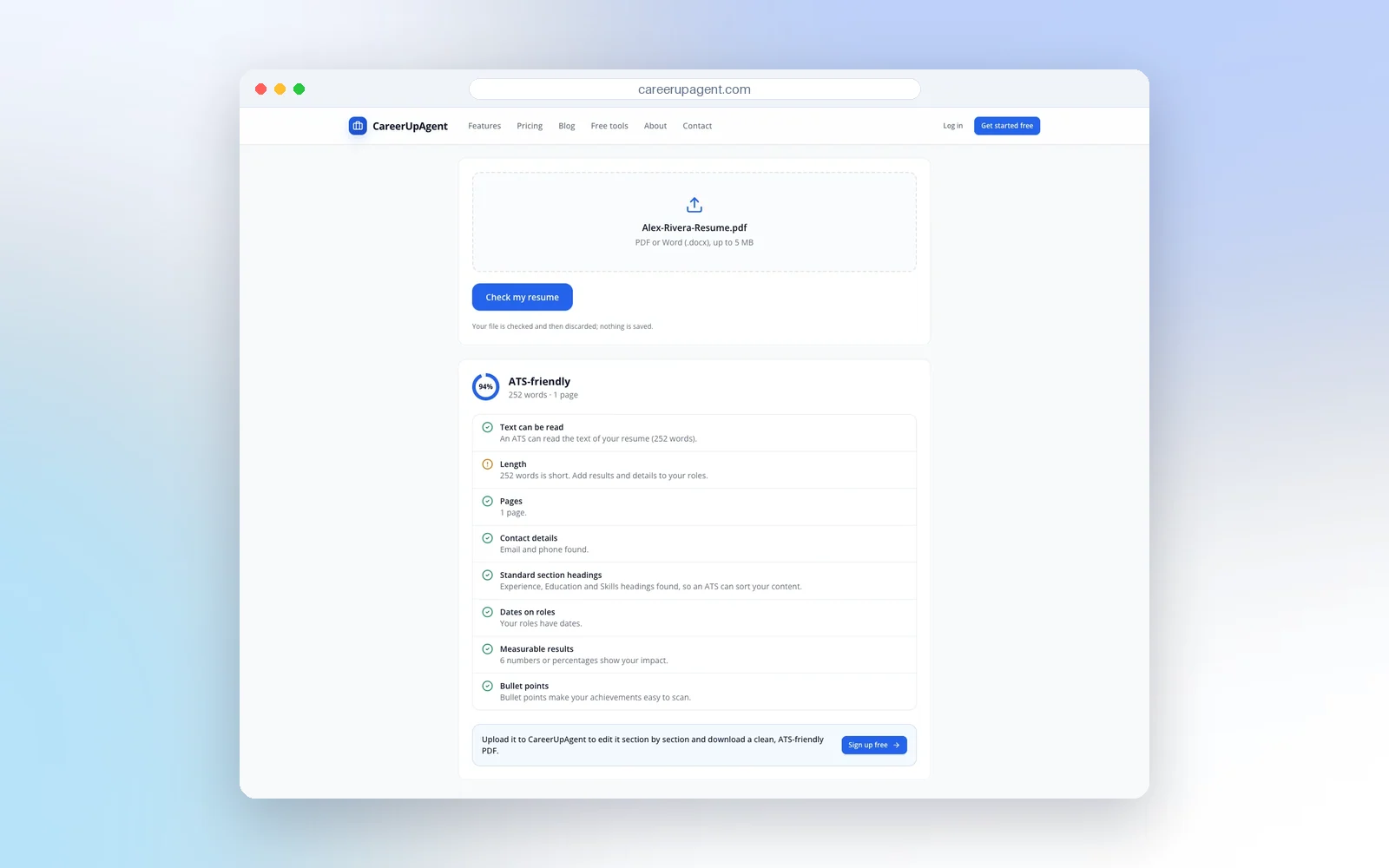
A checker tests format, not fit. A 94% format score tells you a parser can read your file; it does not tell you whether you match the job. Treat it as a quick pre-flight check, not a verdict on your chances.
Format is half the job: check the match too
A resume that parses cleanly still has to speak to the role. That is a separate question, and it is the one a recruiter's search and a human skim both answer. The free resume-to-job match checker compares a pasted resume with a pasted job description and shows the skills it found, the skills that look missing and a few suggestions. The example below uses sample text.
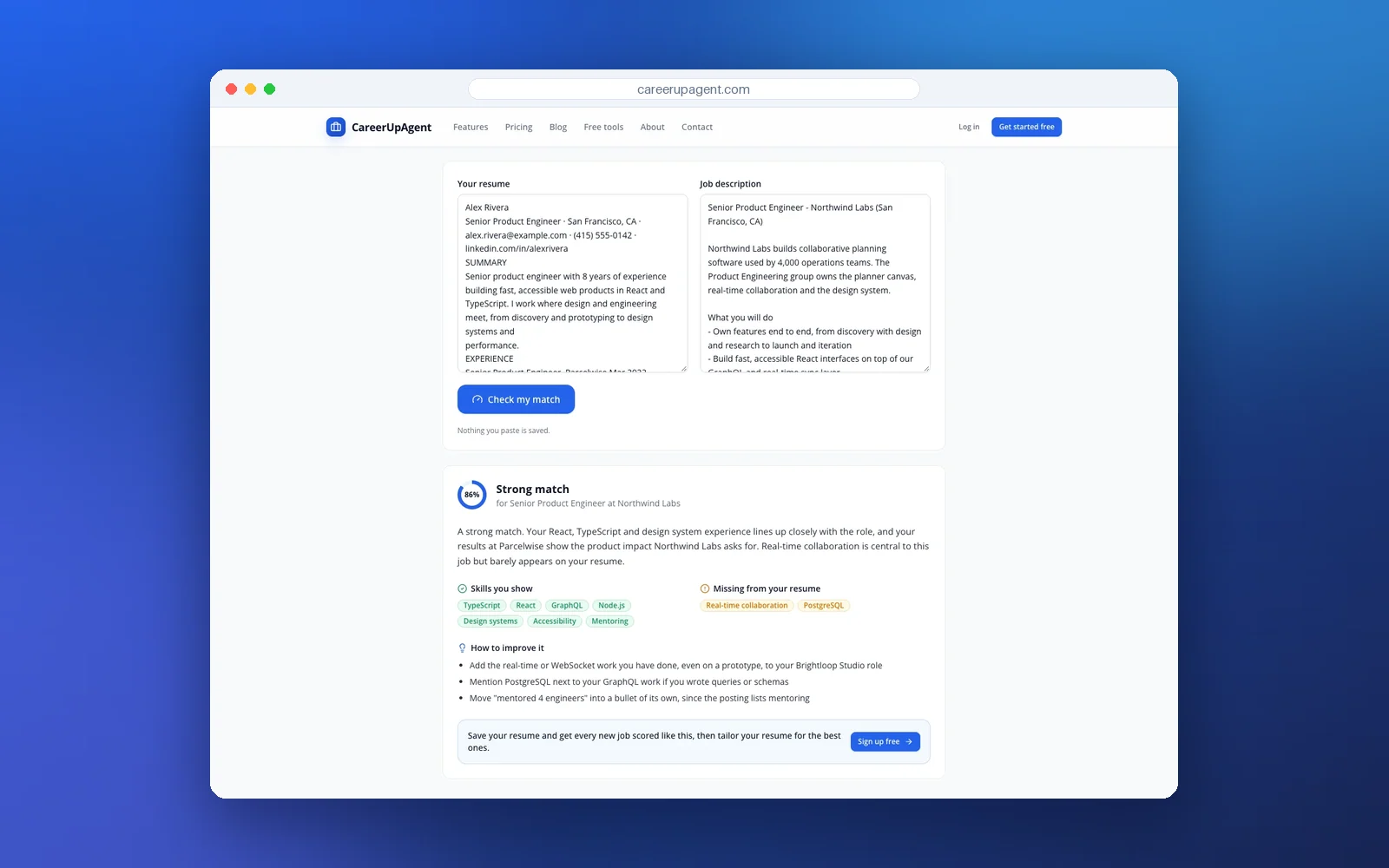
Use the missing-skills list as a prompt to look at your own history, not as a to-do list of words to add. If you really have done the work, say so in the posting's language. If you have not, leave it out.
What to do before your next application
- Open your current resume and run the 7-point checklist. Fix layout and heading issues once, in your master version.
- Export a text-based PDF and try selecting the text. If you cannot select it, the file has no text layer.
- Read the job description and note the title, tools and certifications it names. Mirror the ones that are true for you.
- Answer the knockout questions truthfully and carefully. They are the filters that really are automatic.
- Apply, then spend the saved hours on what an ATS cannot do for you: a short, specific message to a real person at the company.
If you want help keeping each version consistent, create a free CareerUpAgent account and start with your master resume.