
The resume skills section is the smallest block on the page and the one most people fill in last, usually by pasting in everything they have ever touched. A recruiter's eye lands on it early, though, because it is the quickest place to check whether you can do the job. This guide covers what to list, how to group it, and how to match the posting's wording without claiming anything you cannot back up.
Key takeaways
- List 8 to 12 skills that the job actually asks for, not your whole history.
- Mix hard skills (tools, methods) with a few soft skills, and keep soft skills for places where you can show proof.
- Use the posting's own terms only for skills you really have. Never add one to match a keyword.
- Group skills into short labeled lines once you pass about eight, and keep the formatting plain text.
- Rebuild the section for each application from one master list. It takes a few minutes once the list exists.
What the resume skills section is for
The skills section does two jobs. For a human, it is a fast summary: tools, methods and strengths in one glance, before they read your bullets. For an applicant tracking system (ATS) or a recruiter's search, it is a plain-text place where the terms from the job description can appear in context. If you want the detail on how those systems treat a resume, our post on what applicant tracking systems actually read goes through it.
Monster's resume guide describes the section as a quick snapshot of your qualifications that helps you align with the role's requirements and keywords. The same guide also says to place skills in your summary and experience entries, not only in the list. A skill that appears only in the skills section, with no job, project or course behind it, is an easy thing for an interviewer to ask about.
Hard skills, soft skills and everything in between
Most skills fit one of a few groups. Monster lists hard, soft, transferable and in-demand skills. In practice, three questions sort your list faster than the labels do.
- Hard skills are teachable and testable: SQL, Salesforce, bookkeeping, Figma, technical writing, a language you can work in. They answer "can this person do the task on day one?"
- Soft skills describe how you work with others: communication, collaboration, problem-solving, time management. They are real, but they are also the easiest to claim and the hardest to verify.
- Transferable skills carry across jobs and industries: customer service, project coordination, research and reporting. They matter most if you are changing fields or have little formal experience in the target one.
Employers do look for the soft ones. NACE's Job Outlook 2026 Spring Update found that, on the resumes of entry-level candidates, employers want evidence of teamwork, problem-solving and communication skills. The word that matters there is evidence. "Team player" in a list is a claim. "Coordinated a four-person launch checklist" in a bullet is evidence.
A simple rule for soft skills: put one or two in the skills section only when the posting names them, and put the proof in your bullets. If you cannot write a bullet that shows the skill, leave it off the list.

How many skills to list
Fewer than you think. Monster's guidance is to aim for eight to 12 highly relevant skills, and it warns that a crowded section can do more harm than good. Past a dozen, the strong items get lost, and a reader starts wondering how deep any of it goes.
The same guide suggests skipping skills that are outdated or irrelevant to the job, skills you cannot prove, vague or subjective ones, and skills too basic to make an impact. "Microsoft Word" on a marketing manager's resume says nothing. "Google Analytics" says something specific.
Build the section in four steps
The method is the same for a first resume and a tenth. Keep one long master list, and cut it down per job.
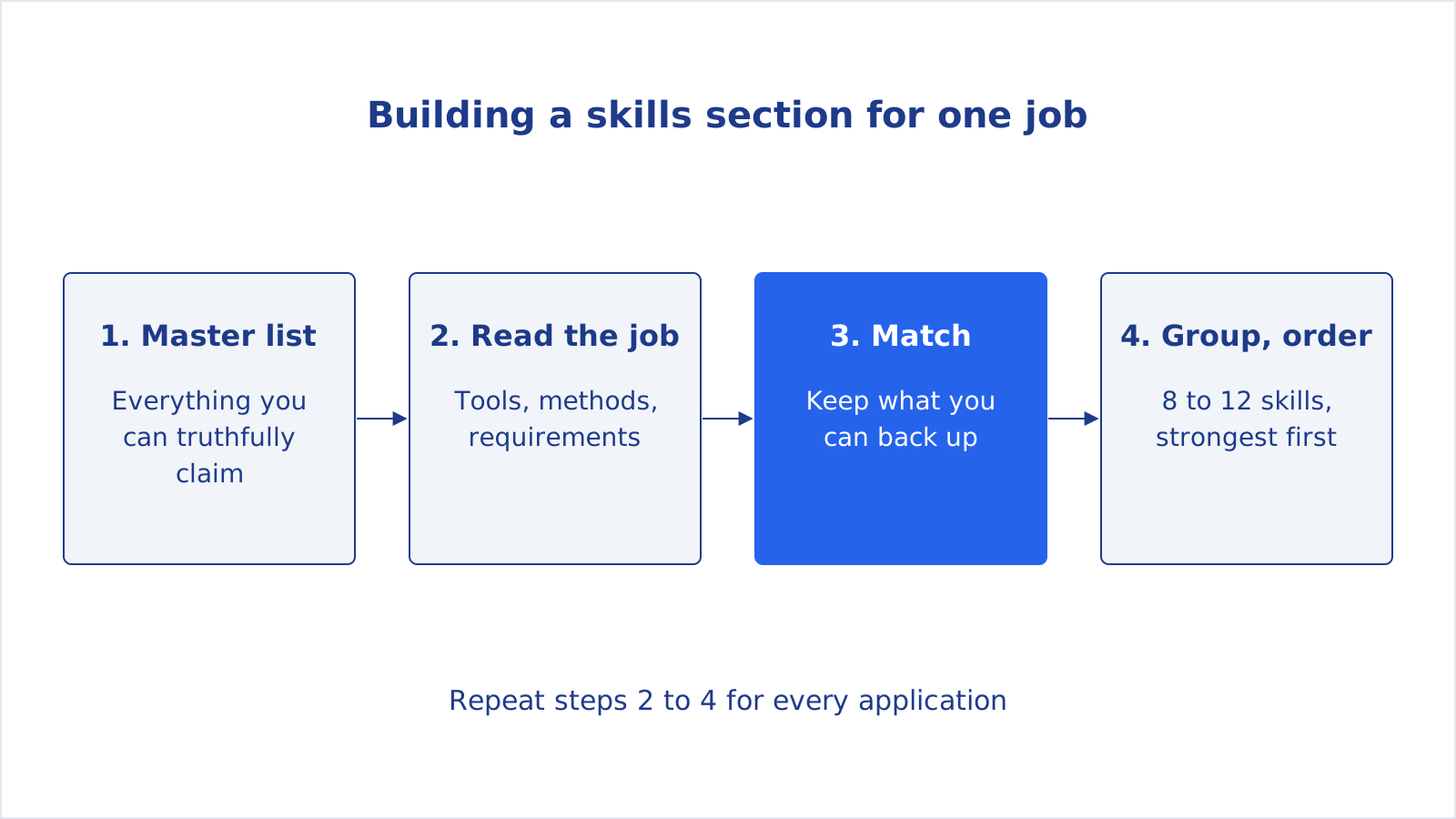
- Write the master list. Include tools, software, methods, certifications, languages and the soft skills you can prove. Pull from jobs, courses, volunteering and personal projects. This list never goes on a resume as it is. It is the pool you draw from. If you keep a master resume for tailoring, the list lives there.
- Read the posting for nouns. Underline the tools, methods and requirements the employer names, especially anything in the title, the "requirements" block and the first lines of the description.
- Match, honestly. For each underlined term, check your master list. If you have the skill, use the posting's wording. If you have a close equivalent, name what you actually used. If you do not have it, leave it out. You can still apply, and the gap is a normal thing to cover in a cover letter or an interview.
- Group and order. Put the strongest, most relevant skills first. Past about eight, split them into short labeled lines.
Match the posting's words without bending the truth
Matching wording is not the same as inventing skills. Take a posting that asks for "customer relationship management (CRM) tools" and a candidate who used HubSpot for two years. "CRM tools (HubSpot)" is accurate and speaks both languages: the generic term for a keyword search, the specific product for a human reader.
The opposite case is a posting that asks for Tableau when you have only used Power BI. Writing "Tableau" would be a risk at the first technical question. Writing "BI dashboards (Power BI)" is true and shows you understand the category. The Monster guide puts it simply: only list skills you can back up through experience, training or results.
A quick check before you send: for every skill on the list, can you describe one time you used it, in two sentences? If not, cut it or take time to build the experience first.
Formats: bullets, categories or columns
Three plain-text layouts cover nearly every case, and they match what Monster describes as lists, categories and columns.
| Layout | Best for | Watch out for |
|---|---|---|
| Single line or bulleted list | Early-career resumes, short lists, admin and service roles | Becomes a wall of words past 12 items |
| Categorized lines (Technical, Tools, Languages) | Technical or multi-skilled roles, career changers | Invented category names that mean nothing to a reader |
| Two or three columns (as a plain table or aligned text) | Experienced candidates with a longer relevant list | Text boxes and graphics that some systems cannot read |
Whatever you pick, keep it plain. The same guide advises skipping graphics, icons and text boxes, because they can stop an ATS from reading the page. That includes skill bars and star ratings. "Python: 4 out of 5" tells a reader nothing and cannot be checked. If you want to see how a file reads to a parser, the free ATS resume checker runs a set of checks on an uploaded file, including whether the text is readable.
Examples by role
These are illustrative examples, not templates to copy. Swap in your own tools and keep only what is true for you.
Software engineer
- Languages: Python, TypeScript, SQL
- Frameworks and tools: React, Django, Docker, Git, PostgreSQL
- Practices: code review, automated testing, CI/CD
Marketing coordinator
- Channels and content: email campaigns, SEO basics, social calendars, copywriting
- Tools: Google Analytics, HubSpot, Canva, Excel
- Working style: cross-team coordination, deadline management
Customer support specialist
- Support tools: Zendesk, Intercom, Slack
- Skills: written communication, de-escalation, knowledge base writing
- Languages: English (native), Spanish (professional)
Career changer
If you are moving into a new field, lead with transferable skills tied to the new role, for example "project coordination, stakeholder communication, data entry and reporting", then add the new tools you have started learning, labeled honestly as coursework or projects. Pair the list with a short, targeted resume summary so the reader sees the link between your past and the role you want.
Where the skills section can get shorter
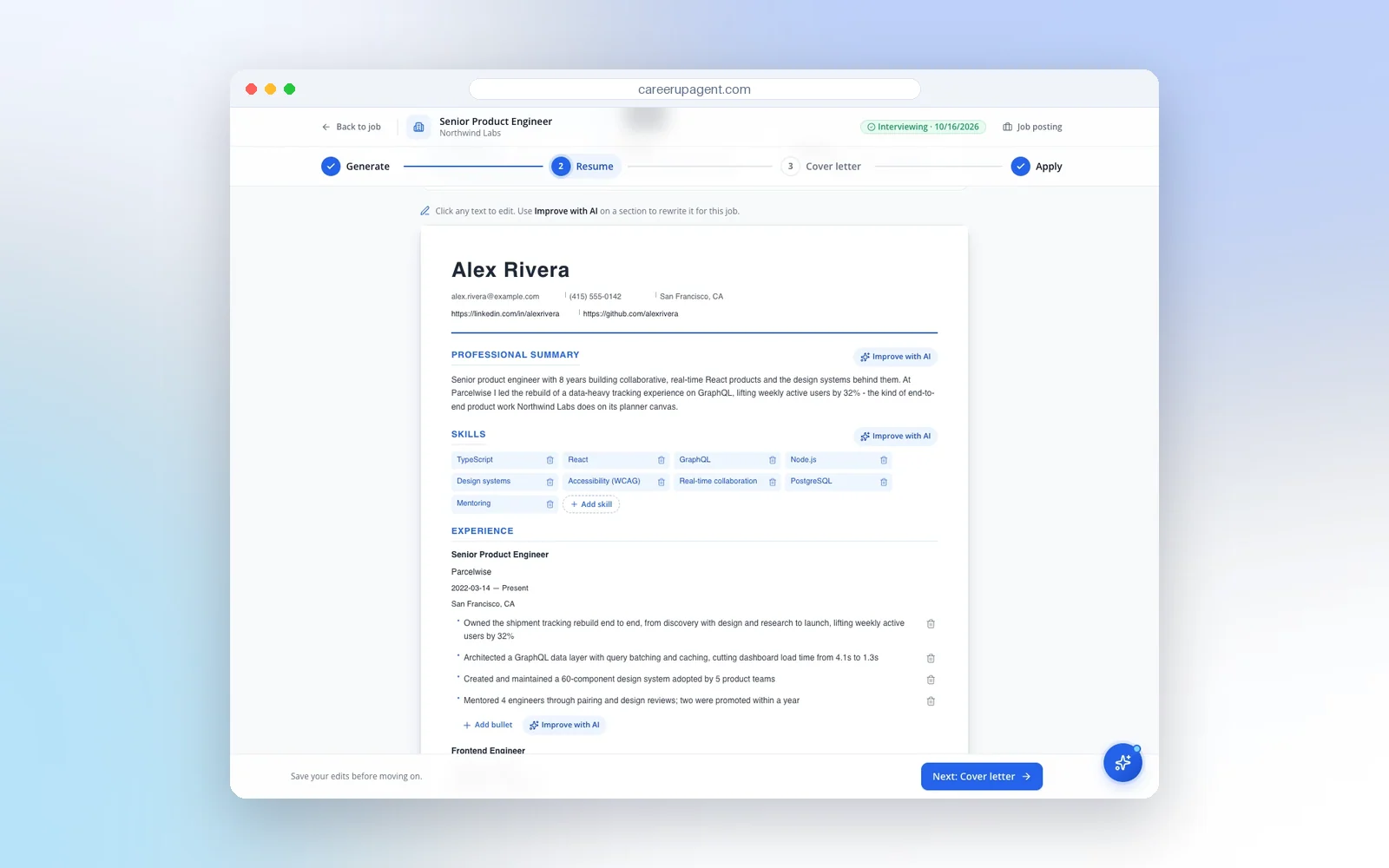
Because every application needs a slightly different list, this section is where the time goes in a tailoring session. In CareerUpAgent, the tailoring step produces a draft resume for a specific job, with a job-specific summary, tailored skills and rewritten experience bullets, and you can edit every part before you use it. The draft starts from the resume you uploaded, so it is a way to reorder and rephrase what you have, not to add what you do not. Read each line and delete anything you could not defend in an interview.
To see how well your resume lines up with a posting before you edit, try the free resume-to-job match checker. It lists the skills it found and the ones it did not, which is a ready-made shortlist for steps 2 and 3 above.
Common mistakes
- The kitchen-sink list. Thirty skills, half irrelevant. Cut to the dozen that fit the job.
- Self-ratings. Bars, stars and "expert" labels. State the skill and let your bullets show the level.
- Soft-skill padding. "Hard-working, motivated, passionate" as a skills list. Show it in an achievement instead.
- Skills with no proof. Anything that appears nowhere else on the resume invites a question you may not want.
- Stale tools. Software that has not been relevant in your field for years makes the whole resume look dated.
- Fancy formatting. Icons, text boxes and images in place of text.
Skills also belong elsewhere. Your summary and experience bullets should name the same key tools and methods in context. The skills section is the index. The bullets are the proof, as described in our guide to resume summaries that fit the job.
A five-minute routine for each application
- Open the posting and underline the tools, methods and requirements it names.
- Open your master list and mark the ones that are true for you.
- Write the section: 8 to 12 items, strongest first, using the posting's wording where it is accurate.
- Check that every skill appears or is supported somewhere in your experience.
- Save the version with the company's name in the file name so you can find it before the interview.
When this takes five minutes instead of thirty, you are far more likely to do it for every application, and that consistency is where tailoring pays off. You can create a free CareerUpAgent account to upload your resume, see its parsed skills and tailor it to a job, reviewing every change yourself.